


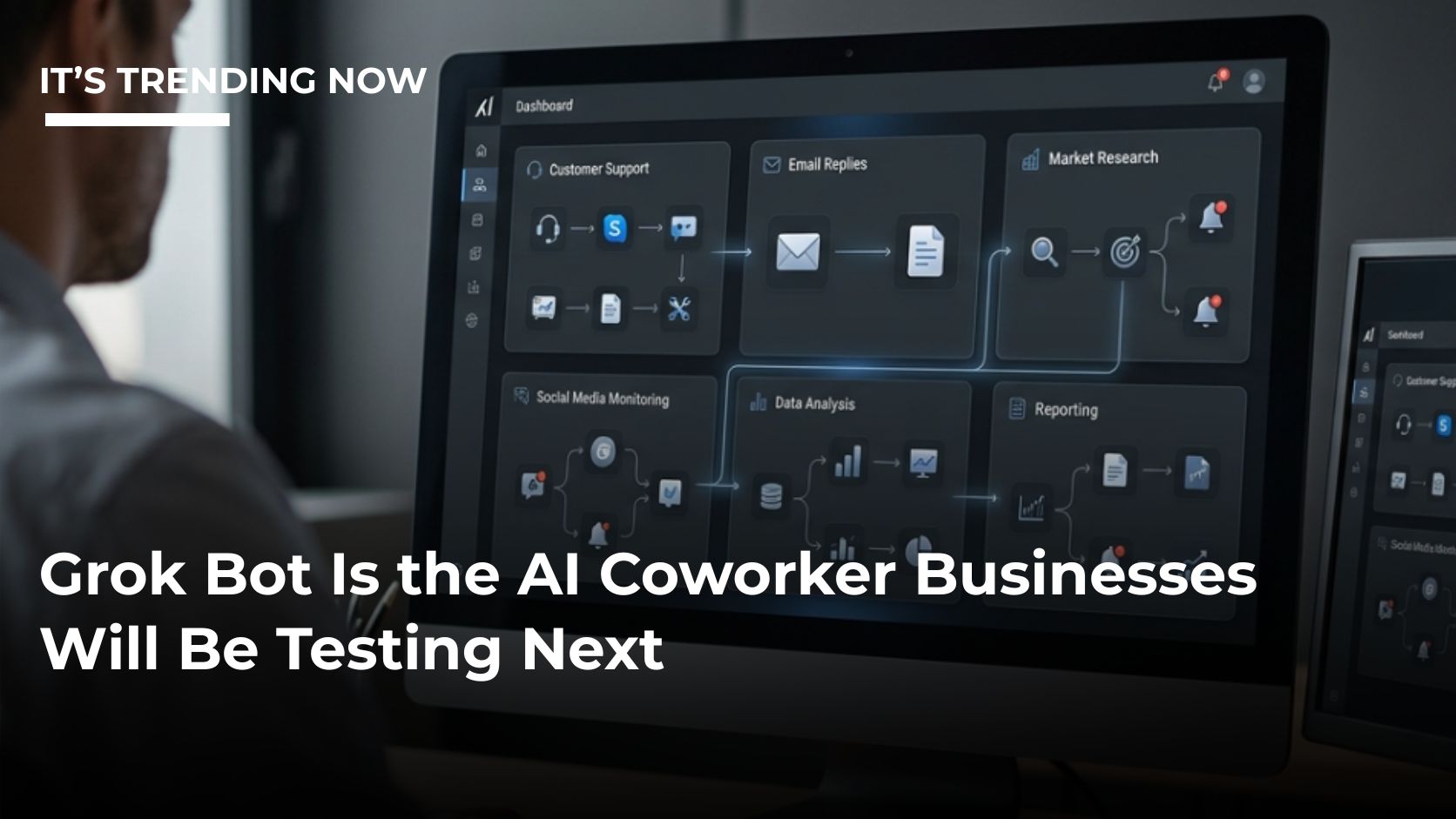
The next big AI trend at work may not be a better chatbot.
It may be a Bot that keeps working after you close your laptop.
Grok Bot, launched in beta in August 2026, is built around persistent AI workers that can use browsers, files and business software, remember what they were doing and repeat successful workflows later.
That is why it is getting attention from people who have already tried the usual AI routine of asking a question, copying the answer and finishing the job themselves.
Grok Bot is trying to finish more of the job.
What Makes It Different?
A normal chatbot waits for you.
You ask something.
It answers.
Then you move the information into whatever app comes next.
Grok Bot is designed to move across the workflow.
A sales Bot can research accounts and prepare outreach.
A marketing Bot can review campaign performance and recommend changes.
A finance Bot can reconcile expenses.
A customer-success Bot can look for churn signals.
A chief-of-staff Bot can scan approved sources and build a daily decision digest.
The big idea is not that AI became better at writing.
It is that AI is becoming better at operating.
It Can Keep Working While You Are Away
One of the most eye-catching features is persistence.
The Bot works through a cloud computer, so a task does not need to stop when your local device closes.
That makes overnight research and scheduled work possible.
It also makes Grok Bot feel more like a coworker than a one-off tool.
You can give a Bot a recurring responsibility, correct its work and eventually save the successful process as a skill.
That skill can later run as a routine.
In practical terms, that could mean the weekly expense cleanup happens every Friday or the sales research happens before the team starts work.
Multiple Bots Can Work Together
Grok Bot supports multiple named Bots, which makes it easy to imagine a little digital team.
One handles research.
Another handles marketing analysis.
Another prepares finance work.
But there is a security detail that is easy to miss.
All of a user’s Bots share the same persistent cloud computer.
That shared environment can include files, browser sessions and command-line credentials.
So the Bots may have different jobs, but they should not be treated as isolated security zones.
That is one of the most important facts for businesses testing the product.
The Smart Rollout Starts With Low-Risk Work
The obvious temptation is to connect every app and see how much the Bot can do.
That is not the recommended approach.
The stronger pattern is to start with read-and-prepare tasks.
Research information.
Summarize accounts.
Compare campaign performance.
Identify missing expenses.
Prepare drafts.
Then review the results.
Only after the workflow becomes reliable should the business consider giving the Bot permission to take more direct action.
That sounds slower, but it is much easier than undoing a bad automated decision.
Yes, It Has Approval Controls
Grok Bot includes an approval system and Auto Review.
Businesses can require the Bot to stop before certain kinds of actions.
That is useful for things like sending external messages, making purchases, transferring money, deleting data, changing permissions, publishing content or touching production systems.
Think of it as a line between “prepare this” and “do this.”
A lot of business value exists on the preparation side of that line.
You Still Need to Handle Sensitive Logins Carefully
Grok Bot is designed to work inside real services, but users are not supposed to paste passwords or two-factor codes directly into a normal chat.
When a sensitive login step appears, the Bot can hand control over to the person.
The person completes the password, passkey, CAPTCHA or payment confirmation, then returns control.
That is a reminder that autonomous does not always mean fully hands-off.
Some workflows will still stop for human checkpoints.
What Can a Small Business Actually Use It For?
The most practical uses are not science-fiction jobs.
They are normal office tasks.
Sales research.
Prospect prioritization.
Weekly expense cleanup.
Paid-media monitoring.
Candidate research.
Customer account health.
Daily management summaries.
Bug reproduction.
Those are all jobs with clear inputs and a clear finish line.
That makes them easier to test than something vague like “run my company.”
How Much Does It Cost?
Grok Bot is not currently sold as its own standalone subscription.
Access is bundled with eligible Cursor plans and can also be linked through qualifying SuperGrok or X subscription routes.
Cursor’s current individual pricing starts at $20 per month for Pro, with larger usage allowances at higher tiers.
Included Grok Bot usage resets weekly. Extra on-demand usage can be available depending on settings.
There is also a trial based on usage credit rather than unlimited access.
That means one huge task can burn through a trial faster than a handful of smaller tests.
The Cost Per Job Matters More Than the Number of Bots
This is where things get practical.
Parallel Bots and scheduled routines consume usage.
So a company should not brag about having 12 Bots unless those 12 Bots are actually saving time.
The better question is: what did the workflow cost, and what did it replace?
If one Bot removes five hours of repetitive admin work each week, that is easy to value.
If another Bot needs constant supervision and correction, it may be creating more work than it removes.
It Is Still Beta
This matters.
Grok Bot is new enough that long-term reliability across normal business environments is not proven.
Websites change.
Sessions expire.
Automation gets blocked.
A Bot can misunderstand context.
A routine can work today and fail after an update.
That is not unique to Grok Bot. It is a common problem with computer-use automation.
Still, businesses should treat early deployment as a pilot, not a finished operating model.
The Biggest Trend Is Bigger Than Grok Bot
Whether Grok Bot becomes the dominant product is almost secondary.
The trend is that AI is moving from answering toward acting.
Businesses are going to see more software that can keep context, use multiple tools, work in the background and repeat processes.
That will force a different question.
What should the AI be allowed to do on its own?
Research is easy.
Drafting is a little more sensitive.
External messages are more serious.
Money, permissions and production changes are more serious again.
The future of AI at work may be less about choosing the smartest model and more about setting the smartest boundaries.
Grok Bot is interesting because it makes that future feel much closer.
The AI coworker is not just waiting in a chat window anymore.
It is starting to get a to-do list.




Comments are closed